

Remote radiation monitoring puts the dose-rate sensor at the inspection point and the reading at the operator. The RDM-10 does this on the same cable and controller as the PTZ70HD and PTZ90HD inspection cameras, so a team surveying a tank, sump, cavity, or fuel-pool area can lower a sensor in first, or send it in with the camera and read dose rate next to the picture.
It earns its place when the reading is written into the inspection plan up front: the field you expect, the access route, the cable length, and what the operator does when the number moves.
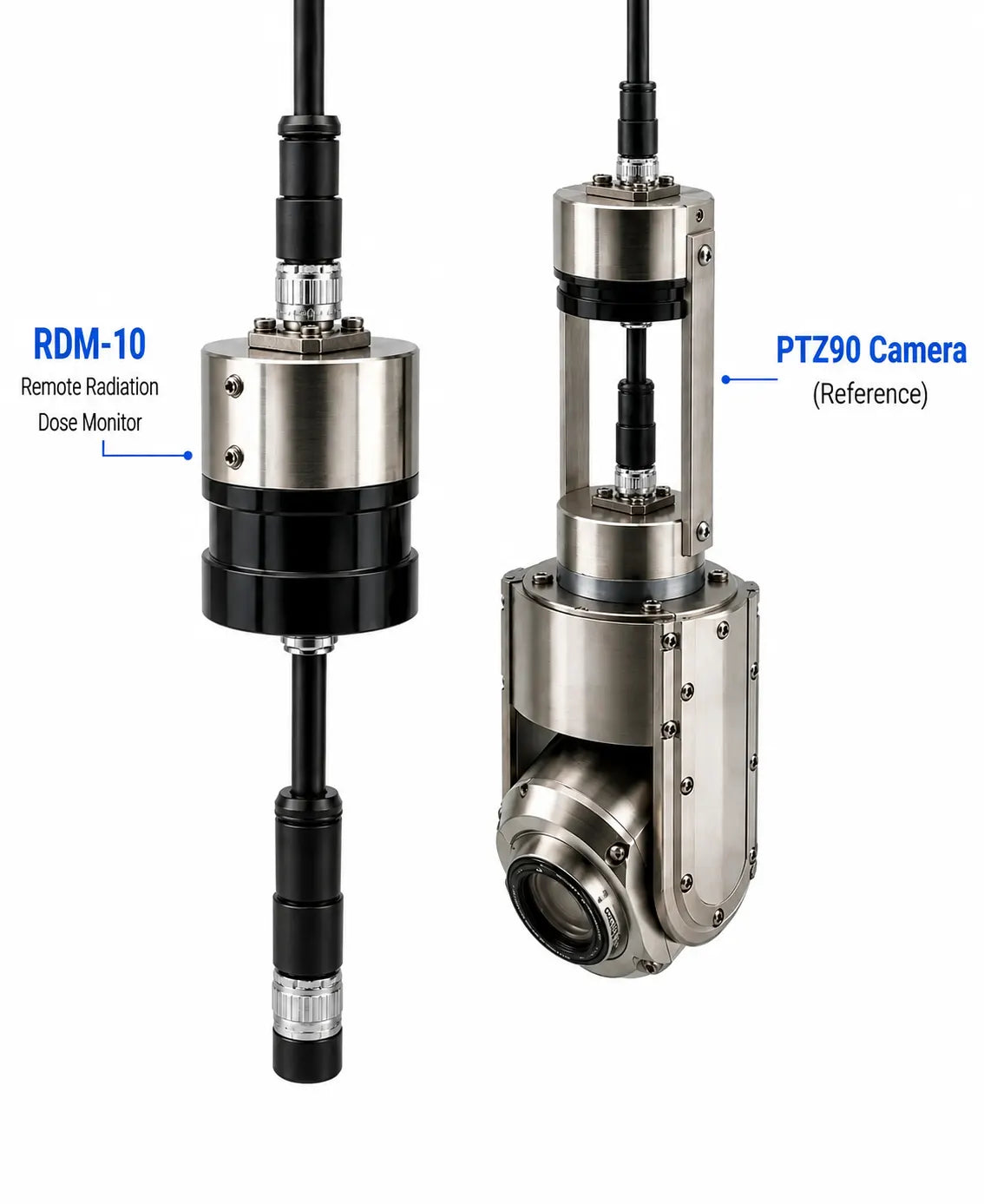
The RDM-10 reads dose rate from 1 mrem/h to 10 rem/h (10 µSv/h to 100 mSv/h, ±15%) and probe inclination on the PTZ70HD/PTZ90HD controller. Run it alone at the cable end to survey before a camera or a person goes in, or in line with the camera head to put a dose rate next to what you're looking at.
Why Remote Dose-Rate Monitoring Matters
A handheld survey meter has to be carried to the measurement point, which means a person, a dose, and a stay time. A sensor on the end of a 150 to 750 ft inspection cable moves the measurement point without moving the person. That is the distance lever in the NRC's time-distance-shielding model, applied to the survey itself and not just to the work behind it.
Survey before entry
Lower the RDM-10 into a tank, sump, cavity, or cell and read the field before anyone, or any camera, commits.
Dose rate next to the image
Mount it at the PTZ head and the controller shows the reading alongside the live picture, so a hot spot can be tied to the feature producing it.
One cable, one controller
No second reel, no second operator, no separate data link. It rides the PTZ70HD/PTZ90HD cable and reads out on the controller you already have.
How the RDM-10 Integrates With Remote Inspection
The RDM-10 is a 48 mm × 76 mm probe that connects to the PTZ70HD/PTZ90HD controller and cable set. Dose rate and inclination appear on the controller display. There is no separate reader, reel, or data link to carry. Mount it at the camera head or at the cable end.
RDM-10 Specifications and What They Mean for Your Setup
RDM-10 specifications are published as preliminary. Send AIT your controller model, cable length, camera head, and access opening and we'll confirm the configuration before quoting.
Cable-End or Camera-Mounted: Choose by What the Reading Has to Prove
The mounting decision follows the inspection objective. If you need a number, run the sensor alone. If you need the number tied to something you can see, mount it on the camera head.
Cable-end only
Use it when you need a number, not a picture: pre-entry surveys, trending a known location, or an opening the camera head won't pass. At 48 mm the RDM-10 fits ports the 72 mm PTZ70HD and 88 mm PTZ90HD heads do not.
Camera-mounted
Use it when the reading has to be tied to a feature: a hot spot on a weld, a debris pile on a pool floor, staining on a liner. The controller shows dose rate and image together.
Access and retrieval
Check the full path in both directions for the assembled length, not just the entry port. RDM-10 alone is 76 mm long; RDM-10 on a camera head is the head length plus the probe.
A Practical Remote Monitoring Workflow
Define the objective
Identify the location, expected field, required data, and decision the measurement will support.
Set up the system
Check range, access size, controller, cable, connectors, mounting, and optional camera head.
Deploy and document
Position the probe, observe dose rate and inclination, and record location, time, conditions, and response.
Interpret Each Controller Output Correctly
Dose rate describes the radiation field at the probe under the conditions present at that time. Inclination tells you whether the probe is hanging plumb, tilted, or resting against something. On a cable drop with no camera it is the only positional feedback you get, and it is what lets the record say the reading was taken at a known orientation rather than while the probe was swinging. An over-range indication means the field has exceeded the instrument's published measurement span. It is not a quantified reading above 10 rem/h (100 mSv/h).
Meaningful records should connect each value to the location, time, deployment configuration, and relevant inspection observation. This context supports comparison between positions and helps the responsible radiation protection personnel decide whether the reading requires a procedural response, another instrument, or a change to the work plan.
Where the RDM-10 and PTZ Pairing Fits
Fuel pool and cavity inspection
The PTZ90HD is pressurized, submersible to 100 m, and built with a radiation-reflective barrier for service in radioactive environments. With the RDM-10 at the head, the pool floor, racks, or transfer canal can be surveyed with a dose rate logged against each view.
Tank, sump, and vault characterization
Drop the RDM-10 alone through a port as small as 48 mm to read the field before deciding whether the PTZ70HD (72 mm) or PTZ90HD (88 mm) goes in, or whether anyone does.
Decommissioning and hot-cell work
Cable-end monitoring where the layout changes as material moves and a fixed area monitor doesn't cover the spot you care about today.
Industrial radiography and process lines
Remote dose rate at a fixed point during exposures or process runs, read from outside the boundary, with the camera head added when you need to see the source position or the line.
Workplace monitoring is not personal dosimetry
The RDM-10 does not report an individual's accumulated dose, identify a radionuclide, or measure contamination. OSHA distinguishes radiation surveys from personnel monitoring, and IAEA guidance distinguishes workplace monitoring from individual monitoring. The responsible organization must assign each instrument its defined role within the applicable license, regulations, radiation protection program, and site procedures.
Pre-Deployment Checklist
Confirm the expected field fits the published dose-rate span.
Check the 48 mm diameter, 76 mm length, bends, and obstructions.
PTZ70HD/PTZ90HD controller, standard or DVR model. Confirm the firmware shows the RDM-10 readout.
Cable-end only, or mounted on the PTZ70HD or PTZ90HD head.
Define actions for normal, changing, and over-range readings.
Prepare fields for location, time, reading, orientation, and observations.
Key Takeaways
- Put the sensor where the camera goes: the RDM-10 rides the PTZ70HD/PTZ90HD cable and reads out on the controller.
- Range is 1 mrem/h to 10 rem/h at ±15%; above that you get an over-range flag, not a number.
- At 48 mm it fits openings the camera heads don't, so a cable-end survey can precede camera entry.
- It is a survey instrument, not a dosimeter and not a spectrometer.
- Write the response to a rising or over-range reading into the procedure before the first drop.
Tell us your controller model, cable length, access opening, and the field you expect, and we'll confirm the RDM-10 configuration before quoting.
Talk to an Inspection Specialist


